Manual Operations
This section is dedicated to guiding operators through the process of conducting manual operations on the BioDryer. Manual operations are an integral part of the system's management, allowing for direct control over specific functions for maintenance or during certain operational conditions. It's important to note that some manual operations are accessible while the BioDryer is in Manual Mode, and others can be executed when it is in Auto Mode.
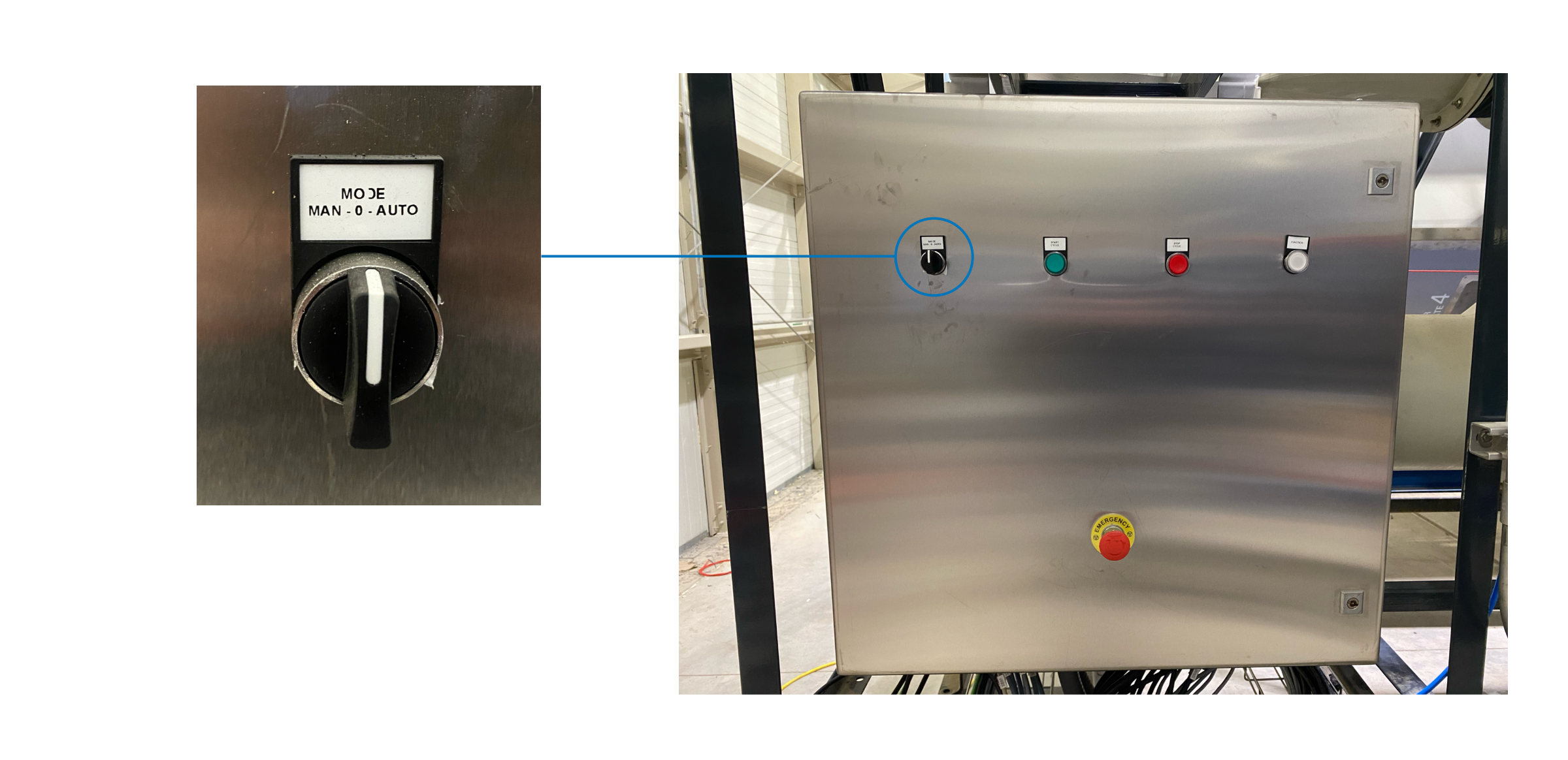
To switch between Manual Mode and Auto Mode, operators are required to physically interact with the machinery. This is done by going to the air skid junction box and manually turning the knob to the desired setting—either to 'Auto' or 'Manual.' This physical action ensures a clear and intentional mode change, helping to prevent accidental alterations that could impact the BioDryer’s operation.
Operations while in AUTO-MODE
Stopping Loading, Unloading, or Drying Operations
Operators can stop the loading, unloading, or drying cycles of the BioDryer using one of the following methods:
- Via the HMI Interface: In the Process Overview tab on the HMI page, click the corresponding toggle button to stop the active cycle.
- Physical Interruption: To manually stop operations, press and hold the red emergency button on the air skid junction box for at least 6 seconds.
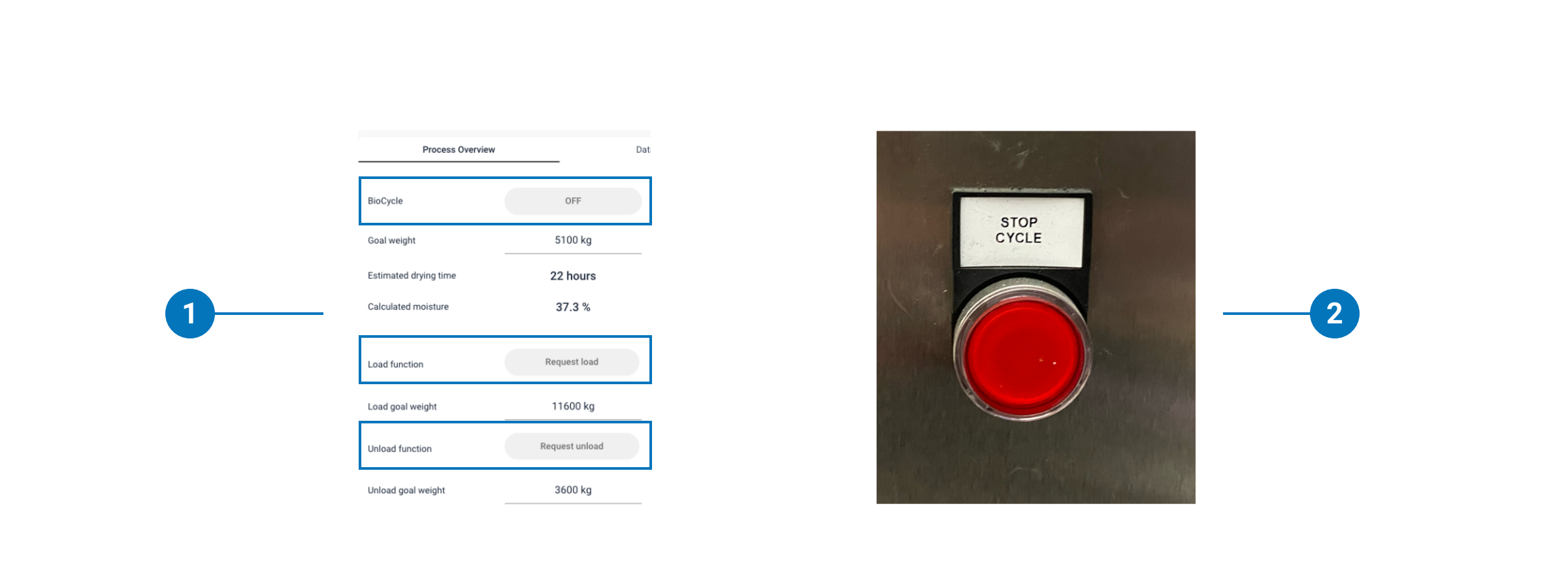
Utilizing these methods allows operators to quickly intervene and halt the BioDryer's operations as necessary.
Rotate the BioDryer
The BioDryer can be manually rotated when no active processes (drying, loading, or unloading) are underway.
-
To rotate the BioDryer to a pre-determined position:
- Navigate to the Manual Operations tab.
- Use the dropdown menu "go to position" to select 'air', 'load', or 'unload'.
- The BioDryer will rotate until it reaches the selected position.
-
To manually initiate rotation to an arbitrary position:
- Set the rotation speed to a value between 10% and 50%.
- Click Start Rotation to begin.
- Press the same button again to stop the rotation.
Start and Stop the Airflow
Operators have the ability to manually control the airflow in the BioDryer, provided that no automated cycles (drying, loading, or unloading) are active and the BioDryer is set to the air position.
-
To initiate the airflow:
- Confirm that the BioDryer is in the air position.
- Adjust the Air speed set to a percentage between 10% and 90%.
-
To cease airflow:
- Reduce the Air speed set back to 0%.
Force Clean the Screw Conveyor
Operators can perform a cleaning operation on the screw conveyor when the BioDryer is not engaged in any active cycles (drying, loading, or unloading) and is positioned for loading.
-
To initiate cleaning of the screw conveyor:
- Ensure the BioDryer is in the load position.
- Navigate to the Manual Operations tab.
- Press the Force Screw Cleaning button to start the cleaning process.
-
To halt the cleaning operation:
- Simply press the Force Screw Cleaning button again.
Operate the Condensate Tank Water Pump
The water pump of the condensate tank can be manually operated by the operator at any time, even during an active cycle.
To operate the water pump:
- Navigate to the Settings page and then to the Washing tab.
- Press the Tank Pump (manual) button to toggle the pump on or off.
Please note, if the operator activates the pump but the tank's low-level sensor is not triggered (indicating insufficient water), the pump will automatically shut off.
Operations while in MANUAL-MODE
Rotate the BioDryer
In Manual Mode, rotation of the BioDryer is controlled physically using the buttons located on the air skid junction box.

- To Rotate Clockwise:
- Ensure the BioDryer is in Manual Mode.
- Press and hold the red button.
- The BioDryer will rotate clockwise at 20% speed.
- Release the button to stop the rotation.
- To Rotate Counter-Clockwise:
- Ensure the BioDryer is in Manual Mode.
- Press and hold the green button.
- The BioDryer will rotate counter-clockwise at 20% speed.
- Release the button to stop the rotation.
Open and Close the Screw Conveyor Gates
For manual operation of the screw conveyor gates:
- Ensure the BioDryer is set to Manual Mode.
- Navigate to the Manual Operations page.
- In the Open/Close Screw Gates section, click the corresponding buttons to toggle the gates open or closed.
Open and Close the Sludge Gates
To manually operate the sludge gates on the BioDryer body:
- Ensure the BioDryer is set to Manual Mode.
- Navigate to the Manual Operations page.
- In the Open/Close Gates section, click the corresponding buttons to toggle each gate open or closed.
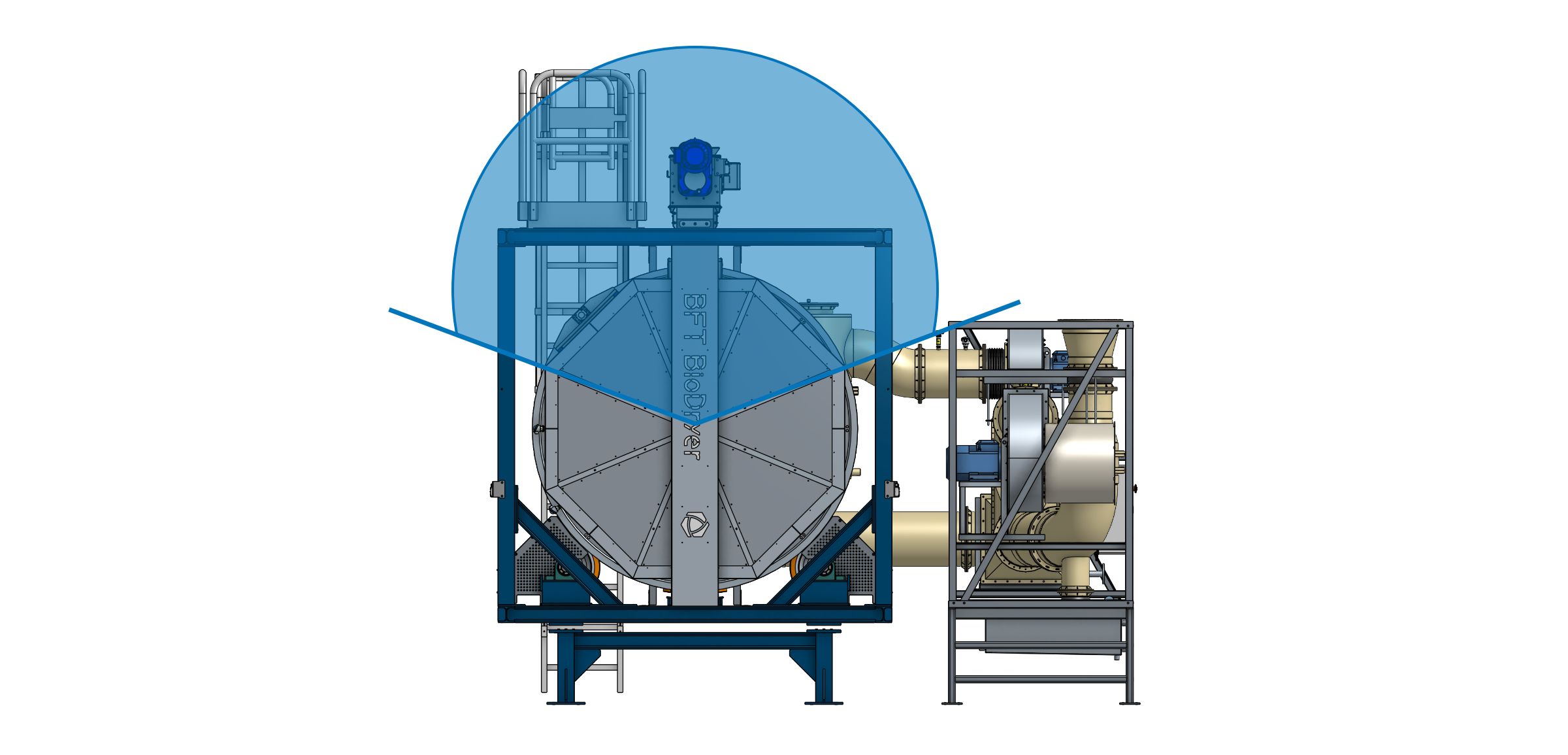
Please note that the operation of the gates is permissible only when they are primarily facing upwards. The BioDryer allows the manual operation of these gates exclusively if it is in the load position or within a specific range of rotation. This precaution is to prevent any spillage of biosolids from the body. Refer to the image below for a visual understanding of permissible gate positions.