
Process setup
How does the BioDryer work?
Understanding the operational mechanics of the BioDryer is essential for effective system setup. The BioDryer operates on a batch processing principle, meticulously designed to handle substantial quantities of biosolids through a series of well-defined steps to achieve the desired dryness level.
- Loading Biosolids: Each batch process begins with the loading of biosolids into the BioDryer. The system can accommodate a range of 4 to 8 tons per batch, allowing flexibility based on operational needs and capacity.
- Drying Cycle: After loading, the biosolids undergo a drying cycle. Operators can select between two drying options: The standard mesophilic cycle is suited for routine drying operations. The "eco-mode" thermophilic cycle, which is an energy-efficient option that utilizes higher temperatures. The duration of the drying cycle can vary from 48 to 72 hours. This timeframe is dependent on factors such as the volume of biosolids being processed and their initial moisture content. Precise control over these drying cycles ensures that the biosolids reach the required dryness in an efficient manner.
- Unloading Dried Material: Once the drying cycle is complete, the BioDryer system proceeds to unload the dried material. This material is now significantly reduced in moisture content and volume, and is ready for the next stage of utilization or disposal.
By cycling through these steps, the BioDryer efficiently transforms wet biosolids into a drier, more manageable state. This batch process is integral to the system setup and is designed to be intuitive and straightforward for operators, ensuring that the BioDryer can be run with optimum efficiency and minimal complications.
Ensure that the biosolids loaded into the BioDryer have a minimum of 17% solid content, in line with the feedstock characteristics specified in the introductory section of this manual. Non-compliance with this specification can adversely affect the BioDryer's performance and operational safety.
Process setup page
Setting up the BioDryer correctly through the HMI interface is crucial for achieving optimal performance. The key to efficient and effective operation lies in carefully inputting the correct values and parameters into the system.
To properly configure the BioDryer for optimal performance, follow the upcoming steps that detail each setting in the HMI interface. These instructions will show you how to adjust settings effectively, ensuring your BioDryer is ready for efficient operation.
General Tab
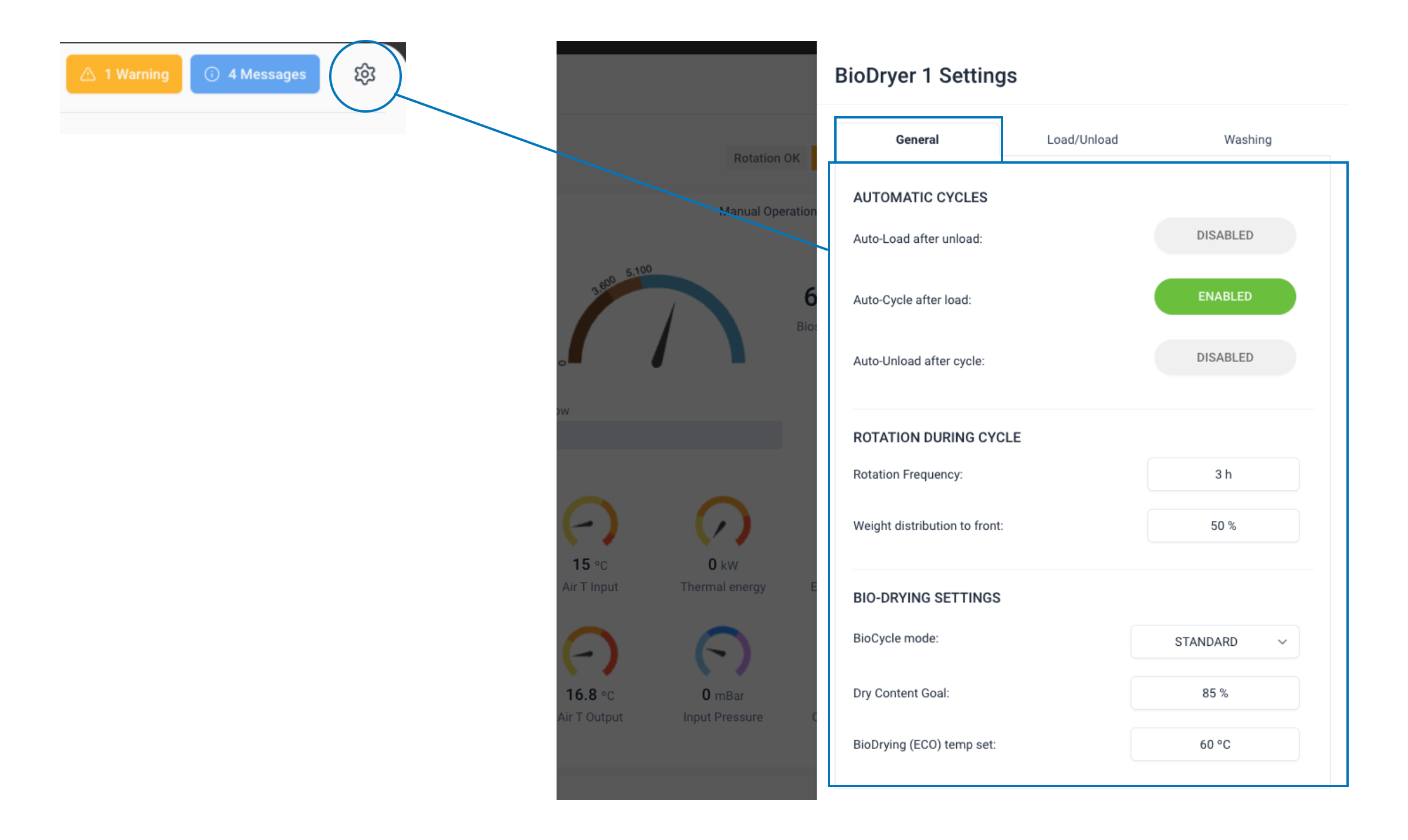
1. Automatic Cycles Setup
The Automatic Cycles Setup in the BioDryer HMI interface offers operators the flexibility to automate various functions of the BioDryer. This section includes three selectable options:
- Auto-Load after Unload: This function automates the loading of biosolids into the BioDryer immediately following an unloading cycle.
- Auto-Cycle after Load: Once the biosolids are loaded, this option initiates the drying cycle automatically.
- Auto-Unload after Cycle: After completing the drying cycle, this setting automates the unloading process.
These options can be activated independently or in combination, depending on the operational needs. When all three are enabled, the BioDryer operates in a fully automated mode — automatically loading to the predetermined load goal weight, initiating and completing the drying cycle until the cycle goal weight is achieved, and then unloading to the set unload goal weight. This process will continue in a loop, providing continuous operation until it is manually stopped or interrupted by an error in one of the cycles. This level of automation enhances operational efficiency and reduces the need for constant manual intervention.
2. Rotation During Cycle
In this section of the BioDryer's control settings, operators can adjust parameters crucial for the mechanical rotation of the biosolids during the drying cycle. This rotation is vital for evenly redistributing the material, ensuring optimal airflow and consistent drying. The two adjustable parameters are:
- Rotation Frequency: This setting dictates the interval between each rotation, measured in hours. By setting the appropriate frequency, you ensure that the biosolids are regularly moved, which is essential for an even drying process.
- Weight Distribution to Front: Expressed as a percentage, this parameter controls the direction of rotation — counterclockwise or clockwise. It determines how the BioDryer should rotate to maintain a specific weight distribution within the machine. Typically, this is set at 50%, balancing the material evenly throughout the drying process.
Adjusting these parameters correctly is key to achieving uniform drying of the biosolids and maintaining the efficiency of the BioDryer's operation. The rotation not only aids in drying but also prevents clumping and uneven moisture levels within the batch.
3. Bio-Drying Settings
In the BIO-DRYING SETTINGS section of the BioDryer HMI interface, operators have the ability to fine-tune the drying process by adjusting three key parameters. These settings are crucial for tailoring the bio-drying process to specific operational goals and efficiency standards:
- BioCycle Mode: This setting allows the operator to choose between two distinct drying modes:
- STANDARD (Mesophilic Process): This mode is characterized by faster processing times, lower temperatures, and higher energy usage. It’s suitable for scenarios where speed is prioritized.
- ECO_MODE (Thermophilic Cycle): Opting for this mode results in slower processing times and higher temperatures but significantly reduces energy consumption. It’s ideal for energy-efficient operations.
- Dry Content Goal: This parameter sets the target for the final solid content percentage in the biosolids after the drying process is complete. Adjusting this ensures the output meets the specific requirements for dryness.
- BioDrying (ECO) Temp Set: When the ECO_MODE is selected, this setting determines the internal temperature to be maintained in the BioDryer, typically set at around 60ºC. This temperature is optimized for the thermophilic cycle, balancing drying efficiency and energy usage.
Proper configuration of these settings is integral to the BioDryer's performance, allowing operators to balance between drying efficiency, energy consumption, and processing time. By customizing these parameters, the BioDryer can be adapted to a wide range of operational contexts and biosolid treatment requirements.
Load/Unload Tab
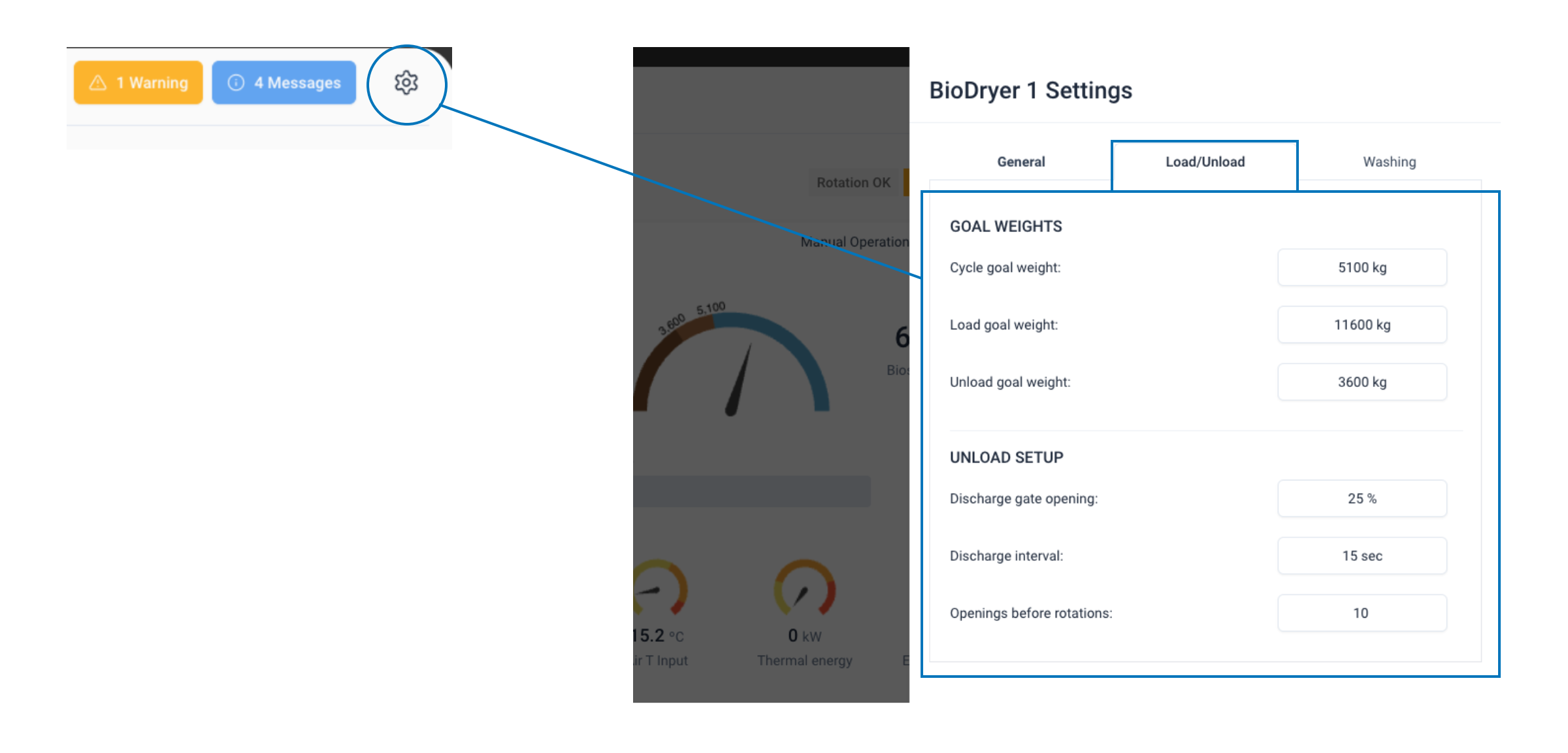
1. GOAL WEIGHTS
- Begin by clicking on the gear icon labeled "BioDryer Setup", located in the top right corner of the HMI interface.
- Once in the setup menu, select the "Load/Unload" tab.
- In this tab, you'll set the goal weights, which are critical for the BioDryer's operation. These settings inform the software how much biosolids should be loaded for each batch, the target amount of water to be evaporated during the drying process, and the desired quantity of dry biosolids to be retained in the machine post-process.
Load goal weight: The "Load Goal Weight" parameter specifies the target weight to be achieved when loading biosolids into the BioDryer. To ensure proper operation. Adjust this parameter to the preferred value, considering the capacity and operational requirements of your BioDryer. The actual net amount of biosolids loaded will be calculated as this set "Load Goal Weight" minus the "Unload Goal Weight." Properly setting this value is crucial for maintaining the balance and efficiency of each drying cycle.
Cycle goal weight: The "Cycle Goal Weight" in the BioDryer determines the target weight at the end of the drying cycle. It's automatically calculated based on the loaded biosolids amount, their initial dry content, and the desired final dry content. To ensure accurate operation:
- Set Final Dry Content: Input the desired dryness level for the finished product.
- Adjust Initial Dry Content: Modify this value on the HMI home page to reflect the current state of the biosolids. These steps are essential for the BioDryer to effectively reach the intended final dryness, ensuring optimal drying performance with each cycle.
Unload goal weight: The "Unload Goal Weight" parameter is crucial as it determines the target weight that the BioDryer should reach by the end of the unloading cycle. This setting effectively dictates the amount of dry biosolids that will remain inside the BioDryer after unloading. It's essential to set this parameter accurately to ensure the correct volume of biosolids is retained for the next cycle, contributing to the continuous efficiency and effectiveness of the drying process.
It’s important to leave a certain amount of biosolids inside the BioDryer before starting a new batch load. This residual amount is crucial for maintaining the continuity and efficiency of the drying process.
- Load goal weight: 11,000 kg (24,000 lbs)
- Unload goal weight: 4,000 kg (8,800 lbs)
- Cycle goal weight: It will automatically change
If you want to manually set the cycle goal weight, you can follow this calculation: ((Load goal weight - Unload goal weight) * biosolids input dry content / desired dry content) + Unload goal weight. Example: ((11000 - 4000) * 0.25 / 0.8) + 4000 = 6,187
2. UNLOAD SETUP
The UNLOAD SETUP section of the BioDryer's HMI interface is dedicated to managing the discharge process of dried biosolids. Proper configuration in this section ensures that the unloading process is smooth and efficient, avoiding any overloading of the unload conveyor system. The settings available for adjustment are:
- Discharge Gate Opening (%): This setting determines the extent to which the discharge gate opens during each unloading cycle. Adjusting the gate opening percentage allows for control over the flow rate of the biosolids, ensuring that the quantity discharged is manageable and consistent with the capacity of the unload conveyor.
- Discharge Interval: This parameter sets the frequency of gate openings, dictating how often the gate will open to release the dried biosolids. A well-timed discharge interval is crucial to maintain a steady flow and prevent any sudden surges that could overwhelm the conveyor system.
- Openings Before Rotation: This setting controls how many times the discharge gate opens before the BioDryer initiates a rotation cycle. The rotation of the BioDryer is essential for evenly distributing the dried biosolids within the machine, ensuring that the discharge process is uniform and efficient.
Configuring these parameters correctly is key to a smooth unloading process. Given that dried biosolids flow rapidly, precise timing and control of the discharge gate are crucial to ensure the unload conveyor operates without complications. Proper management of these settings in the UNLOAD SETUP section ensures a consistent and controlled flow of biosolids, contributing to the overall efficiency of the BioDryer's operation.
Washing tab
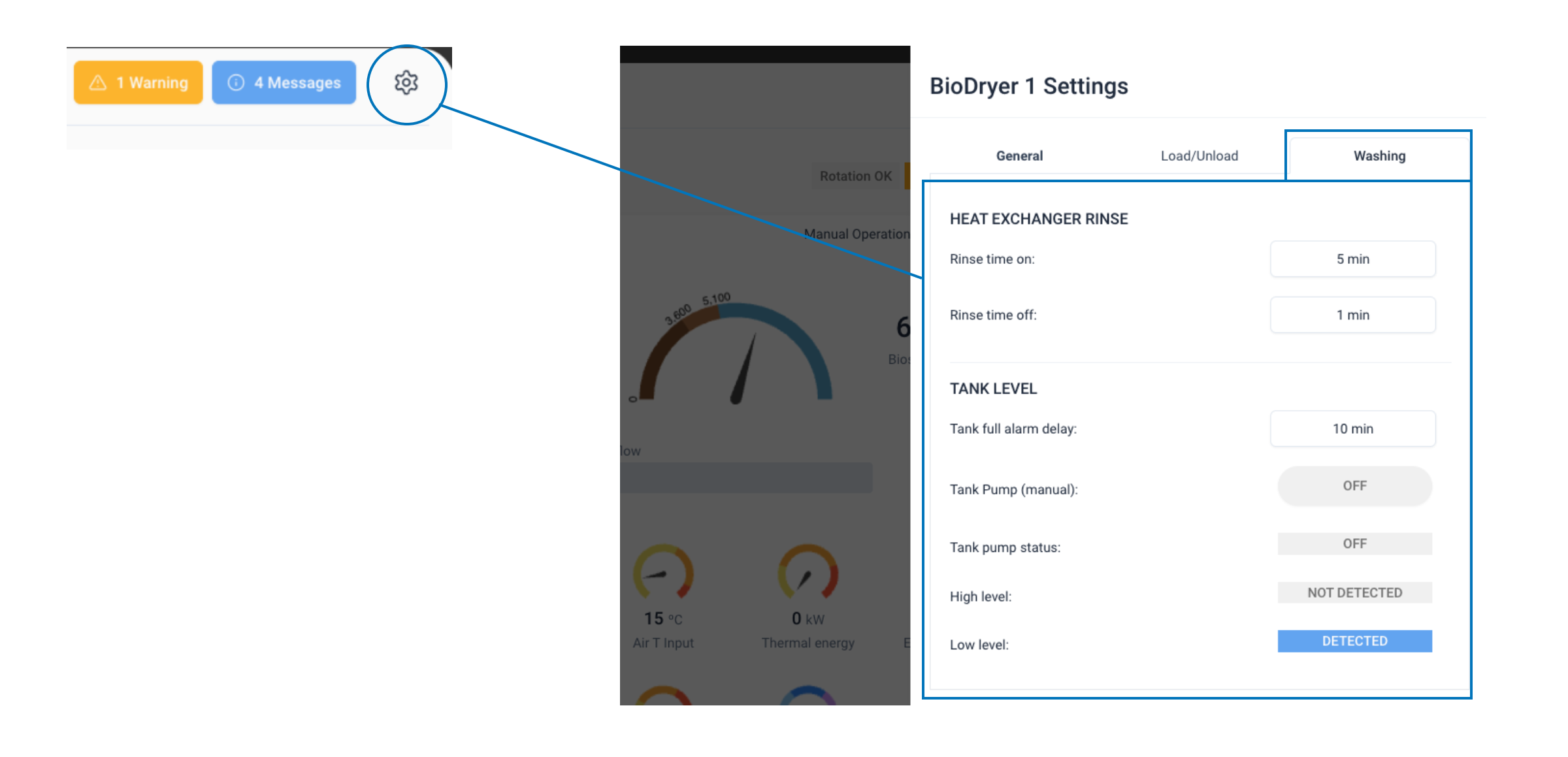
1. HEAT EXCHANGER RINSE
The HEAT EXCHANGER RINSE section in the BioDryer's control interface allows operators to manage the maintenance of key components, specifically the heat exchanger and the filter, through an automated rinsing process. This feature is vital for ensuring these components remain clean and function efficiently throughout the drying cycle. The settings here include:
- Rinse Time On (in minutes): This setting specifies the duration for which the cleaning spray nozzle will actively rinse the heat exchanger and filter. Setting this time correctly ensures that the components are sufficiently cleaned without excessive water usage.
- Rinse Time Off (in hours): This parameter determines the frequency of the rinsing cycles by setting the interval between each rinse. A well-calibrated off time ensures regular cleaning without interrupting the drying process unnecessarily.
Suggested values for these settings are typically 3 minutes of spraying every 6 hours. This balance ensures regular cleaning to maintain optimal heat exchange and filtration efficiency, without overburdening the system or disrupting the bio-drying process. Adjusting these parameters according to operational needs and environmental conditions can help in maintaining the BioDryer's effectiveness and longevity.
2. TANK LEVEL
In the TANK LEVEL section of the BioDryer's control interface, operators can monitor and manage the condensate tank, which plays a crucial role in collecting water during the drying process. This section provides insights and control over various aspects of the tank's operation:
- Tank Full Alarm Delay: This setting, adjustable in minutes, is designed to trigger an alarm if the high-level detection sensor in the tank remains active for longer than the specified time. This feature is particularly important as it can indicate potential issues, such as a malfunctioning pump, which requires immediate attention to prevent overflow or damage.
- Tank Pump Status Monitoring: Operators can view the current operational status of the tank pump, ensuring it is functioning correctly and efficiently.
- High and Low-Level Sensor Monitoring: This functionality allows for continuous monitoring of the water levels within the tank through high and low-level sensors. It provides real-time information about the tank's filling status, ensuring that it operates within safe and optimal parameters.
- Manual Tank Pump Control: If the BioDryer is set to Manual Mode, operators have the ability to manually activate the tank pump. This control is essential for scenarios where automatic pumping is either not desirable or feasible, allowing for direct intervention by the operator.
The TANK LEVEL section is integral to the safe and efficient operation of the BioDryer, as it ensures proper management of the condensate produced during the drying process. Regular monitoring and correct configuration of these settings are key to maintaining the system's effectiveness and preventing issues related to water accumulation.
Suggested parameters
In this final section, we provide a comprehensive list of suggested settings for the BioDryer. These recommendations serve as a starting point for a standard setup, ensuring efficient operation. Remember, these parameters might need fine-tuning based on specific operational conditions and biosolid characteristics.
Automatic Cycles Setup
- Auto-Load after Unload: Activate for continuous operation.
- Auto-Cycle after Load: Enable for automated drying process.
- Auto-Unload after Cycle: Only activate this if you have a way to ensure dry biosolids can be unloaded (a truck level sensors for example) otherwise leave inactive.
Rotation During Cycle
- Rotation Frequency: Every 4 hours for even drying.
- Weight Distribution to Front: Keep at 50% for balanced rotation.
Bio-Drying Settings
- BioCycle Mode: ECO_MODE for energy efficiency or STANDARD for faster processing.
- Dry Content Goal: Set based on desired output dryness, typically around 75-85%.
- BioDrying (ECO) Temp Set: Suggest 60ºC for ECO_MODE.
Goal Weights
- Load goal weight: 11,000 kg
- Unload goal weight: 4,000 kg
Unload Setup
- Discharge Gate Opening: 25% to ensure manageable biosolid flow.
- Discharge Interval: Set to every 10 seconds, depending on conveyor capacity.
- Openings Before Rotation: 10 openings
Heat Exchanger Rinse
- Rinse Time On: 3 minutes for efficient cleaning.
- Rinse Time Off: Every 6 hours to maintain cleanliness without excessive interruptions.
Tank Level
- Tank Full Alarm Delay: Set to 10 minutes to promptly indicate pump issues.