
Three Month Maintenance
For A Complete List with other Time Frames See Section:
Complete Maintenance Schedule
To maintain optimal operational efficiency, it's crucial to consistently follow maintenance schedules from both past and current time periods.
Three Month interval Operations
Estimated total man-hours of downtime: 360 minutes per BioDryer (6hr's)
The time estimate above accounts for the prior time period's operations and includes the operations for the current time period.
| Section | Description | Time Estimate (man hours) | LOTO? |
|---|---|---|---|
| BioDryer Skid | BioDryer Drive Wheel Bearings Inspection and Greasing | 0.5 hours | LOTO is Required |
| BioDryer Skid | Rotation test and inspection | 1 hour | Not Required |
| BioDryer Skid | Reactor Body Visual Inspection | 0.5 hours | Not Required |
| Air System | Intake Filter media replacement | 0.5 hours | LOTO is Required |
BioDryer Drive Wheel Bearings Inspection and Greasing
These bearings enable smooth operation of the drive wheels, directly affecting the system's overall mechanical performance. Proper lubrication of these bearings not only reduces wear and tear but also prevents potential operational hiccups. By keeping these components in top condition, we can prevent unexpected downtimes and prolong the equipment's lifespan.
Personal Protective Equipment:


Timeframe
- Estimated total of 0.5 man hours to complete.
Procedure
-
Safety First
- Put on the PPE to protect yourself from any potential hazards.
-
Initiate LOTO Procedure
- If LOTO procedure is already initiated and the main switch is in "OFF" position, move on to step 3.
- Initiate the LOTO procedure ensuring the equipment is not energized.
-
Cleaning and Clearing
- Use a rag or cleaning materials to clean the area around the drive wheel bearings. Remove any dirt, debris, or old grease that may obstruct the inspection.
-
Visual Examination
- Carefully examine the drive wheel bearings for wear, damage, or loose components.
-
Grease the Bearings
- Find the zerk fittings on each bearing. Using a grease gun, distribute grease until old grease begins to extrude from the bearing. Each biodryer has (4) drive wheels, each drive wheel has (2) bearings that need grease. (1) on each side of every wheel. For a total of (8) bearings that need greased per biodryer. (See Figures #1 - #4)
-
System Activation
- If everything is in order and no additional maintenance is required, the system can be energized and returned to normal operation.
- Remove Lockout-Tagout (LOTO) by turning the main switch on the electrical panel to the "ON" position. Reset the 24v components by pressing the blue reset button until the light goes out.
- Reactivate the BioDryer to normal operational mode using the Human-Machine Interface (HMI).
Figures:
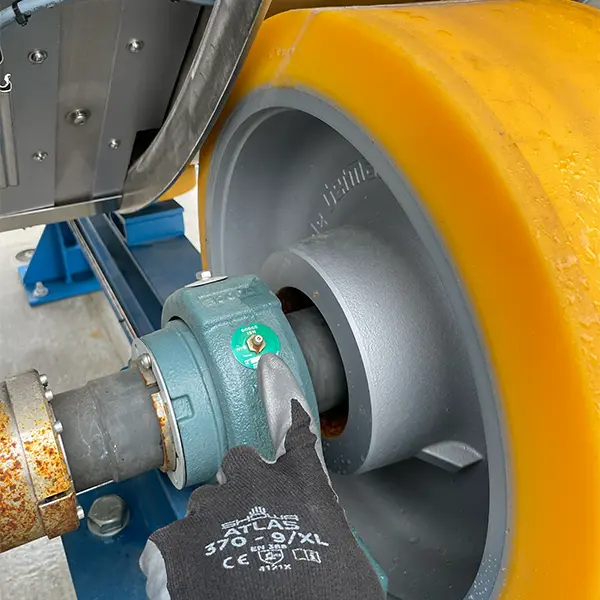
Figure #1
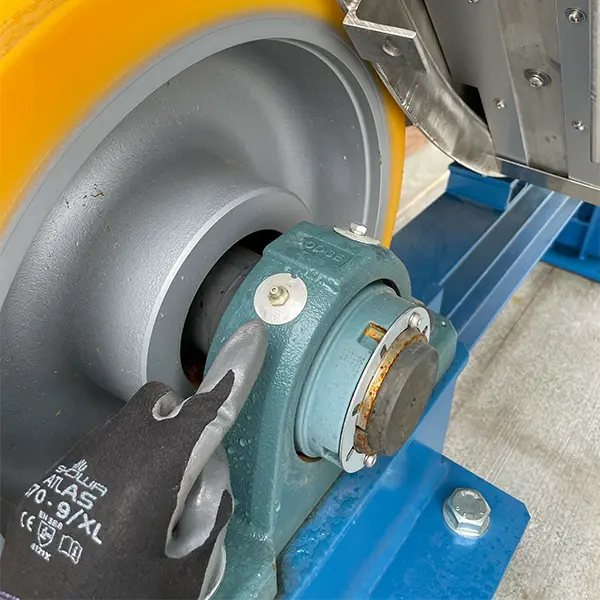
Figure #2
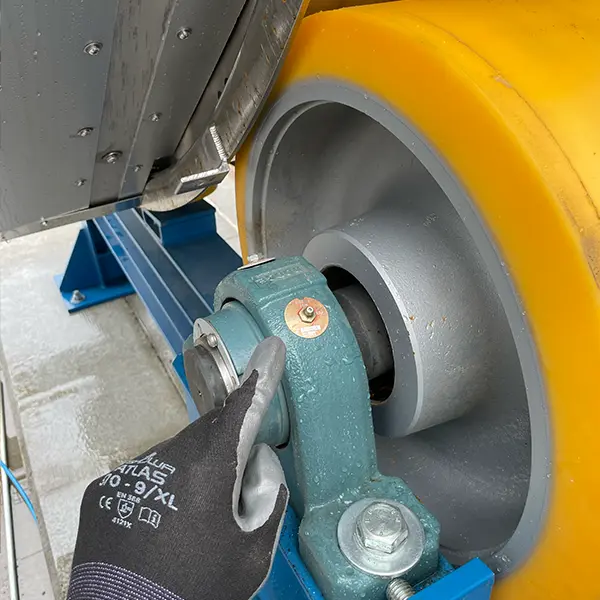
Figure #3
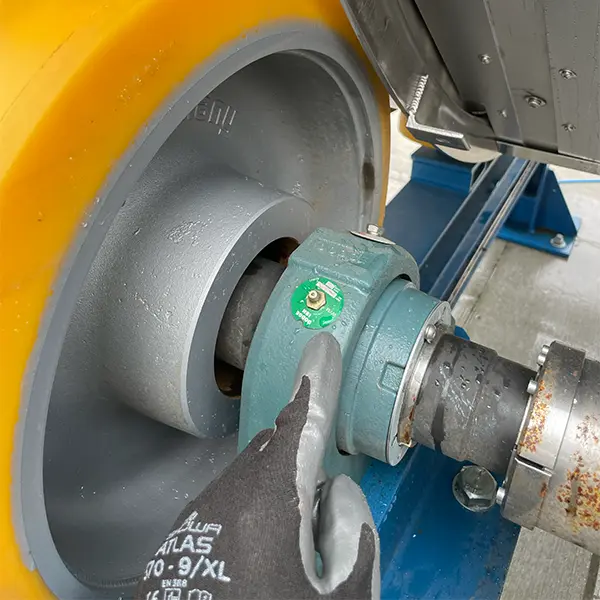
Figure #4
Rotation test and inspection
The Rotation Test and Inspection is a procedure for ensuring the smooth operation of the BioDryer rotation system. It involves manually initiating the BioDryer's rotation and carefully observing its mechanics to detect any irregularities or unexpected noises, particularly between the wheels and the rails.
Personal Protective Equipment
Timeframe
- Estimated total of 0.25 man hours to complete.
Procedure
-
Safety First
- Put on the PPE to protect yourself from any potential hazards.
-
Put BioDryer into Auto Mode
- Using the HMI panel set the BioDryer into auto mode and make sure that no automated cycles (drying, loading, or unloading) are active.
-
Rotation Testing
- Rotate the BioDryer into the air position by follwong the steps under auto operations to rotate the BioDryer
- While testing the rotation of the BioDryer listen for any friction from the equipment. Example locations from the Drive wheels or Guide wheels scraping along the guide rail.
- Visually confirm that the BioDryer is centrally rotating about its axis. (no pitch or yaw is visually observed)
- Visually inspect the BioDryer body rails to make sure they are not scraping on the side of the drive wheels
To test the BioDryer's rotation capability of allignment, repeat steps 1 and 2 to rotate the BioDryer through the positions:
- Load Position
- Unload Position
-
System Activation
- Reactivate the BioDryer into normal operational mode using the Human-Machine Interface (HMI).
Reactor Body Visual Inspection
The electrical slip ring and encoder, rotation proximity sensor, alongside the rotation wheels and four gearboxes, are integral components ensuring the smooth and efficient operation of the BioDryer. The reactor body's four gearboxes play a pivotal role in facilitating the rotational movement necessary for the biodrying process, making their inspection and upkeep essential to the system's overall functionality. The electrical slip ring and proximity sensor further contribute to the seamless coordination of components, enhancing the BioDryer's performance and reliability.
Personal Protective Equipment
Timeframe
- Estimated total of 0.5 man hours to complete.
Procedure
-
Safety First
- Put on the PPE to protect yourself from any potential hazards.
-
Put BioDryer into Auto Mode and Air Position
- Using the HMI panel set the BioDryer into auto mode and make sure that no automated cycles (drying, loading, or unloading) are active.
- Rotate the BioDryer into the air position by follwong the steps under its section of operating the BioDryer while in MANUAL-MODE.
-
Visual Inspection of rotation wheel gearboxes
- While the body is rotating carefully examine the rotation wheels gearboxes for any visible signs of damage, wear, or irregularities. (See Figure #1 - #3)
- Pay attention to any loose components, leaks, or unusual sounds during the inspection.
-
Proximity Sensor Inspection
- Examine the rotation proximity sensors and its associated tightening nuts. (See Figure #3)
- Check if the tightening nuts are properly tensioned. If not gently tighten to handtight.
- Make sure the sensing head for the proximity sensors are between 5mm and 7mm away from the sensing plates on the BioDryer rails. (See Figure #4)
-
Visual Inspection of electrical slip ring and encoder
- Examine the electrical slip ring and encoder for any visible signs of damage, wear, or irregularities.
- Make sure the springs are not damaged. If so replace them
- Pay attention to the hardware and their condition. Tighten the nuts/screws to be hand tight.
-
System Activation
- Reactivate the BioDryer to normal operational mode using the Human-Machine Interface (HMI).
Figures:
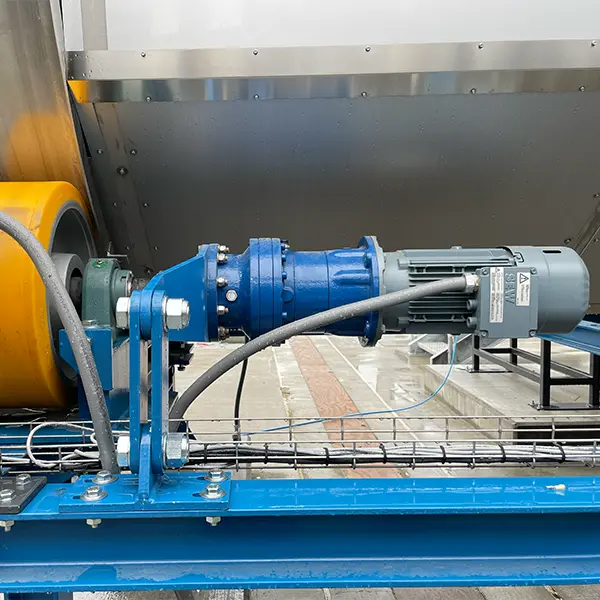
Figure #1
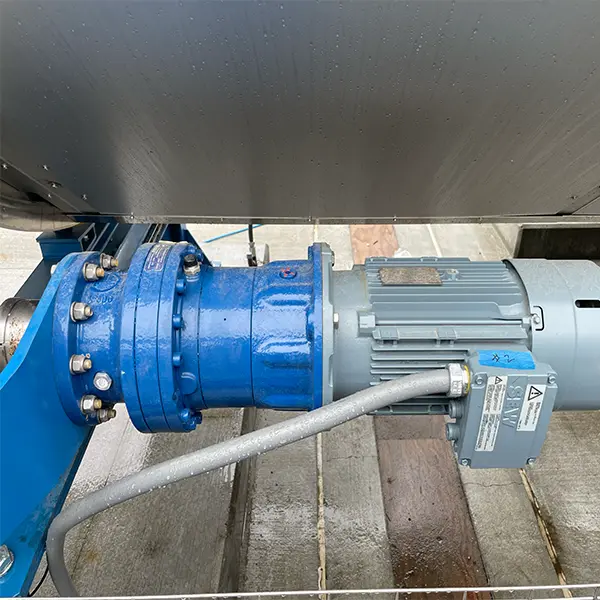
Figure #2
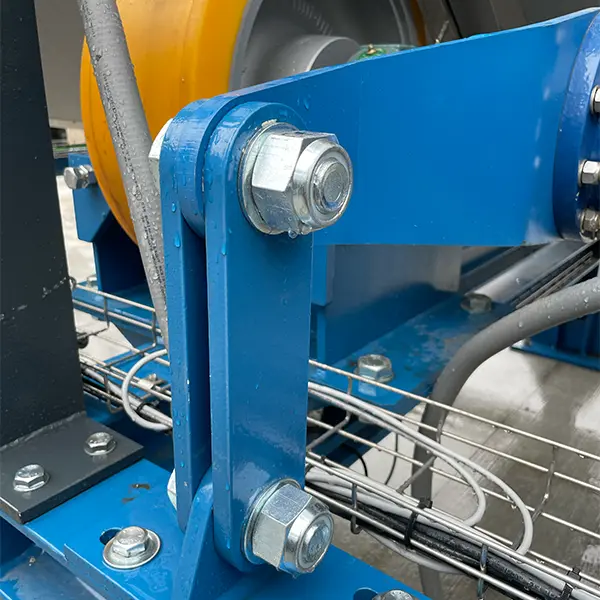
Figure #3
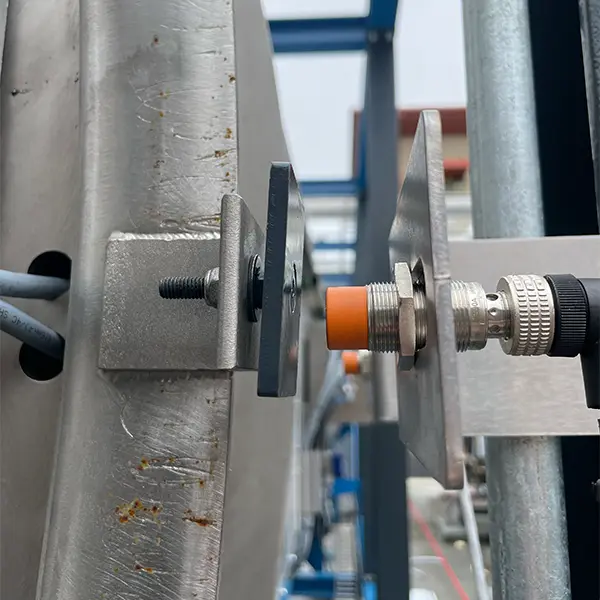
Figure #4
Intake Filter Inspection and Media Replacement
A clean and well-maintained filter is vital for maintaining optimal airflow into the BioDryer. Adequate airflow is not just about preserving mechanical efficiency; it also plays a crucial role in sustaining the right environmental conditions for the microbial activity within the system. The bacteria responsible for the biodrying process thrive in well-aerated environments, and any reduction in airflow can negatively impact their efficacy. By ensuring the intake filter is clean and functioning correctly, you help maintain the necessary balance of energy and bacterial activity, which is fundamental to the BioDryer’s overall performance and longevity.
Personal Protective Equipment:
- Rubber dipped work gloves
Timeframe
- Estimated total of 0.50 man hours to complete.
Procedure
-
Safety First
- Put on the PPE to protect yourself from any potential hazards.
-
Cut the filter media to size
- Cut a sheet of filter media from the Viledon P15/500S fabric roll. Size must be 5'7" x 1'7".
-
Locate retention bar
- Find the retention bar held on by (2) plastic knobs.
-
Remove retention bar
- Remove the retention bar by unscrewing both plastic knobs. (See Figure #2)
-
Remove & Wash Mesh Screen (if present)
- Remove grommets from fixed bolts on the body of the blower. Once the outer screen has been removed, hose off any debris and dust buildup. Visually inspect the remaining components of the intake filter for holes or damage.
-
Replace media
- Once the old filter media has been removed, replace it with new filter media.
-
Re-install mesh screen (if present)
- Reinstall the mesh screen with the new filter media in place, re-install mesh screen by fastening grommets onto fixed bolts. Re-install the retention bar and fasten it into place by tightening the plastic knobs.
-
System Activation
- Reactivate the BioDryer to normal operational mode using the Human-Machine Interface (HMI).
Figures:
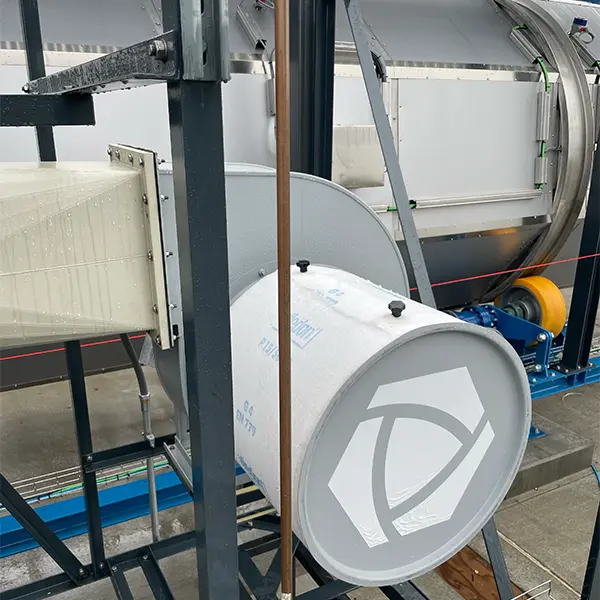
Figure #1
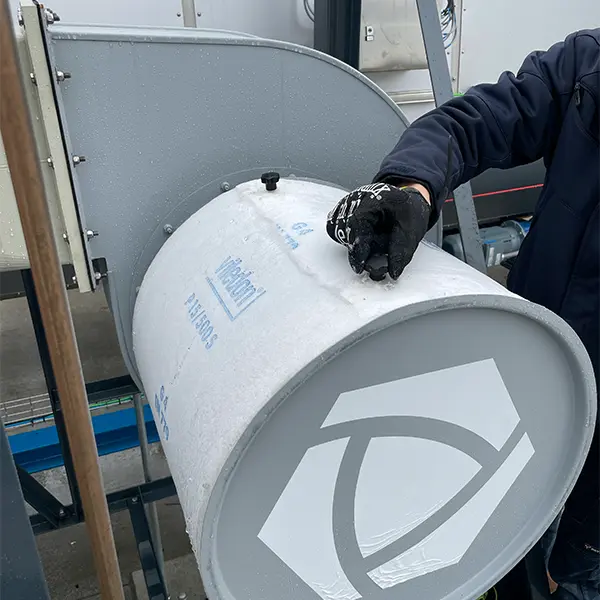
Figure #2