
Twelve Month Maintenance
For A Complete List with other Time Frames See Section:
Complete Maintenance Schedule
To maintain optimal operational efficiency, it's crucial to consistently follow maintenance schedules from both past and current time periods.
Yearly interval Operations
Estimated total man-hours of downtime: 1710 minutes per BioDryer (28.5hr's)
The time estimate above accounts for the prior time period's operations and includes the operations for the current time period.
| Section | Description | Time Estimate (man hours) | LOTO? |
|---|---|---|---|
| Air System | Blower and Poly Propylene Pipe Cleaning | 8 hours | LOTO is Required |
| Air System | Condensate tank wash | 1 hour | LOTO is Required |
| BioDryer Skid | Replace Rotary Joint o-rings | 4 hours | LOTO is Required |
| BioDryer Skid | Inspect BioDryer Guide Wheels | 0.25 hours | LOTO is Required |
| All | Gearboxes Oil Inspection | 2 hours | LOTO is Required |
| All | Sensor Inspection and Cleaning | 1 hours | Not Required |
Blower and Poly Propylene Pipe Cleaning and Hardware Inspection
A visual inspection of Polypropylene Pipes to ensure structural integrity and cleanliness. Looking for any cracks or damage to the pipes. Removing and cleaning the pipes after the BioDryer, between the BioDryer and the air-to-air heat exchanger. After re-installing the pipes check that all hardware interconnecting the pipes are hand tight.
Personal Protective Equipment


Timeframe
- Estimated total of 8 man hours to complete.
Procedure
-
Safety First
- Put on the PPE to protect yourself from any potential hazards.
-
Initiate LOTO Procedure
- If LOTO procedure is already initiated and the main switch is in "OFF" position, move on to step 3.
- Initiate the LOTO procedure ensuring the equipment is not energized.
-
Locate and Inspect Polypropylene Pipes Piping
- Examine all of the pipe's within the air system visually for signs of wear, damage, or deterioration. Look for the following:
- Cracks, splits, or punctures in the pipe material
- Excessive Discoloration or fading
- Deformation or irregular shape
- Signs of corrosion or chemical damage
- Identify the locations of Polypropylene Pipes within your system that require additional cleaning. (See Figure #1)
- Examine all of the pipe's within the air system visually for signs of wear, damage, or deterioration. Look for the following:
-
Removing Polypropylene Pipes Piping
- Using the 13mm wrench's remove the pipes inbetween the biodryer and air-to-air heat exchanger for a complete cleaning.
-
Cleaning the Polypropylene Pipes Piping
- Use a clean cloth or sponge and a soap and water solution to clean them. Avoid using harsh chemicals that may damage the pipe material.
- Rinse the pipes thoroughly with clean water.
-
Locate and Inspect Blower
- Locate the blower that will also require cleaning. (see Figure #1)
- Examine the blowers position and mounting hardware, checking for any deformation or wear of the equipment.
-
Cleaning the Blower
- Use a clean cloth or vacuum cleaner to remove any particulates that has accumulated along the blades and inside of the blower assembly.
-
Re-Install the polypropylene pipes
- Using the hardware that was previously attached to the Pipes, re-attach the PP pipes to the Air-System.
-
Sealing Inspection
- Ensure that any joints or connections between Polypropylene Pipes are properly sealed. Check for any visible gaps or signs of leakage. Ensure that each bolt interconnecting pipes are hand tight.
-
Supports and Hangers
- Inspect the supports and hangers that hold the pipes in place. Ensure that they are secure and in good condition. Look for signs of corrosion or damage.
-
System Activation
- If everything is in order and no additional maintenance is required, the system can be energized and returned to normal operation.
- If Lockout-Tagout (LOTO) is engaged, remove it by turning the main switch on the electrical panel to the "ON" position. Reset the 24v components by pressing the blue reset button until the light goes out.
- Reactivate the BioDryer to normal operational mode using the Human-Machine Interface (HMI).
Figures:
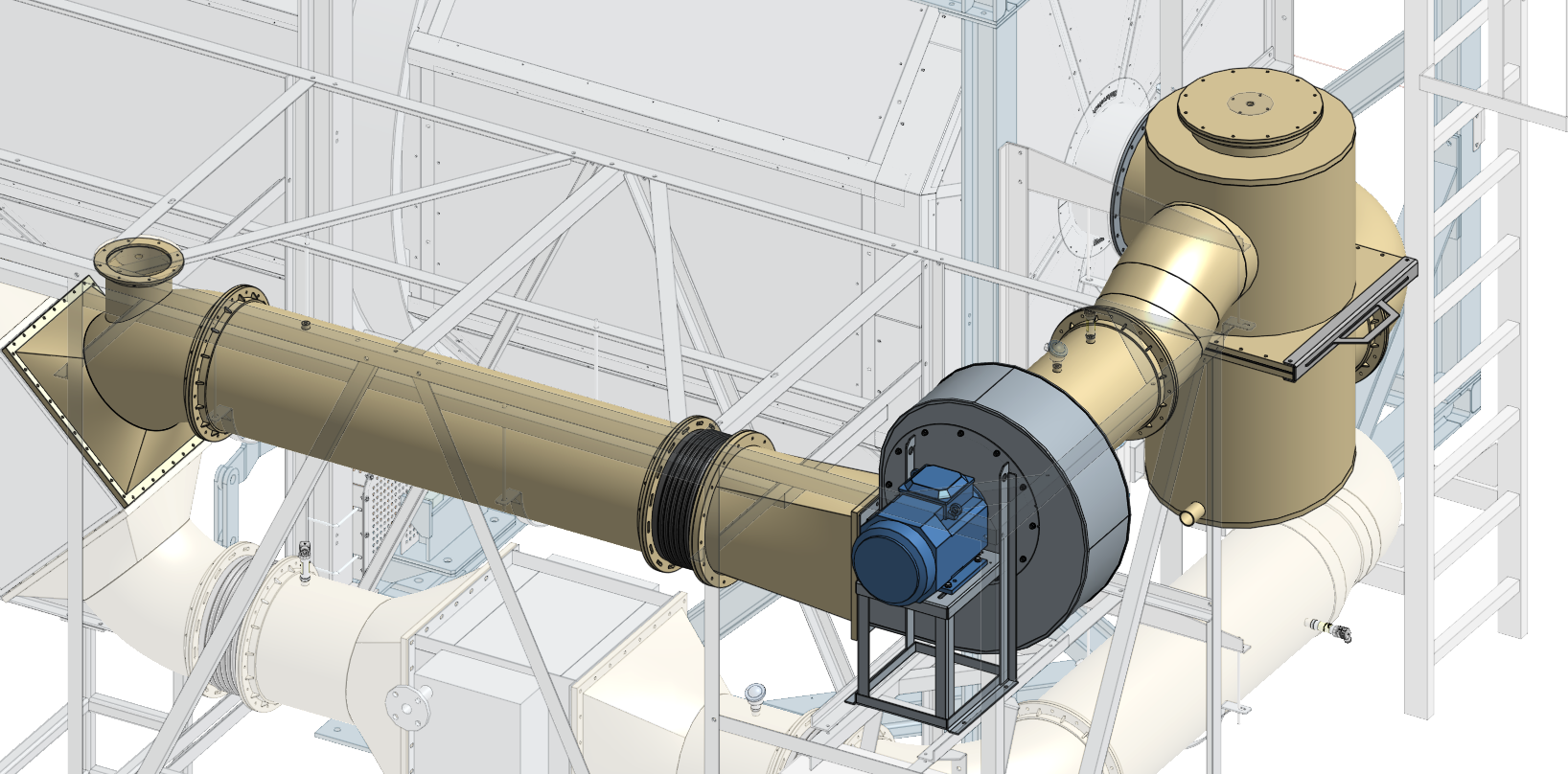
Figure #1
Complete Condensate Tank Wash
Periodically cleaning the condensate tank is an important maintenance operation. It prevents excess buildup of material that may cause future blockages and unplanned down time.
Personal Protective Equipment:
Timeframe
- Estimated total of 1 man hour to complete.
Procedure
-
Safety First
- Put on the PPE to protect yourself from any potential hazards.
-
Turn off any BioDryer Cycles
- If a process (drying, loading, or unloading) is active, cease it by following the outlined procedure within Operations section.
-
Locate and Inspect Condensation Tank
- Identify the location of the condensation tank and verify that it is in proper working condition.
-
Remove the Condensation Tank
- Remove the condensation tank from the Air-Skid and move to a safe place to wash it with water and soap if required.
-
Cleaning:
- Completely clean the codensation tank, cleaning all inlet and outlets.
-
Install Condensation Tank
- Using the same hardware, re-install the tank.
- Ensure that the gaskets are properly seated and provide a tight seal between the pipes and fittings.
-
System Activation
- If everything is in order and no additional maintenance is required, the system can be energized and returned to normal operation.
- If Lockout-Tagout (LOTO) is engaged, remove it by turning the main switch on the electrical panel to the "ON" position. Reset the 24v components by pressing the blue reset button until the light goes out.
- Reactivate the BioDryer to normal operational mode using the Human-Machine Interface (HMI).
Replace Rotary Joint O-Rings
The O-Rings situated at the BioDryer's entry point are crucial for preventing backflow of gas or air from the system into the environment. These O-Rings, positioned at the junction where the Polypropylene (PP) pipes connect to the BioDryer, are susceptible to environmental wear and require periodic replacement to maintain a secure and environmentally safe seal.
Personal Protective Equipment
Timeframe
- Estimated total of 4 man hours to complete.
Procedure
-
Safety First
- Put on the PPE to protect yourself from any potential hazards.
-
Initiate LOTO Procedure
- If LOTO procedure is already initiated and the main switch is in "OFF" position, move on to step 3.
- Initiate the LOTO procedure ensuring the equipment is not energized.
-
Locate the connection point of PP pipes to BioDryer
- On the back of the BioDryer there is two pipe connections, the bottom one has a butterfly valve and the top connection uses a rotary Joint with two O-Rings on the inside of the top PP pipe.
-
Disconnect the PP pipes
- Using an 13mm wrench carefully disconnect the PP pipes from the BioDryer, by removing all of the hardware. Ensuring all connections are safely and correctly released to avoid damage.
-
Remove old O-Rings and Install new O-Rings
- Remove the old O-Rings from the Inside of the pipe. Thoroughly clean the area before installing new O-Rings to ensure a tight and secure seal.
-
Re-Install PP pipes
- Using the 13mm Wrench carefully re-install the PP pipes at the connection point. If necessary use a rubber mallet to gently tap the edge of the outer pipe, ensuring a secure fit without damaging the PP pipes.
-
Testing and check for leaks
- Re-Energize the system by de-activating LOTO. Remove the Lockout-Tagout (LOTO) by turning the main switch on the electrical panel to the "ON" position. Reset the 24v components by pressing the blue reset button until the light goes out.
- Conduct a thorough test to check for any leaks at the connection points. By activating the blowers and initiating a flow of air within the pipes, inspecting the areas around the newly installed O-Rings for any sound or sight of a leak.
-
System Activation
- If the installation is successful with no leaks and all maintenance is complete, the system can be returned to normal operation. Reactivate the BioDryer to normal operational mode using the Human-Machine Interface (HMI).
Inspect BioDryer Guidewheels
The guidewheels located underneath the BioDryer prevent any damage to the drive wheels by maintaining the alignment of the BioDryer rotation along the guide rails. Keeping the Drive wheels within the center of the channel. A periodic inspection of the guidewheels is requested once a year. Through stress and environmental factors the material can chip or break away. If wear is noticed on the Guidewheel then replace with a new set.
Personal Protective Equipment
Timeframe
- Estimated total of 0.5 man hours to complete.
Procedure
-
Safety First
- Put on the PPE to protect yourself from any potential hazards.
-
Initiate LOTO Procedure
- If LOTO procedure is already initiated and the main switch is in "OFF" position, move on to step 3.
- Initiate the LOTO procedure ensuring the equipment is not energized.
-
Locate and Inspect Guidewheels
- Underneath the BioDryer there are two sets of two guidewheels for the guiderail to follow. Located Here
- Inspect the Guidewheels for any signs of damage or excessive wear.
- If damage is noticed contact BioForceTech for a replacement set.
If the Guidewheels are in good condition then skip steps 4-5. Moving on to the system activation step.
-
If Replacement required Remove Guidewheels
- Using the 22mm wrench's detach the mounting hardware and slide the wheels out from under the BioDryer.
-
Install Replacement Guidewheels
- Install the New Guidewheels by sliding the replacement set into position then securing it with the bolts through the I-beam.
-
Testing Rotation
- Remove Lockout-Tagout (LOTO) by turning the main switch on the electrical panel to the "ON" position. Reset the 24v components by pressing the blue reset button until the light goes out.
- Conduct a test to check for any scraping or tilt in BioDryer Rotation, by Setting BioDryer to Auto Mode and rotating the BioDryer multiple times.
-
System Activation
- Reactivate the BioDryer to normal operational mode using the Human-Machine Interface (HMI).
Gearbox Oil Inspection
As the gearbox manufacturer advise, changing the oil every 5000 operating hours or annually is necessary to maintain seamless gearbox functionality.
Personal Protective Equipment
Timeframe
- Estimated total of 4 man hours to complete.
Procedure
-
Safety First
- Put on the PPE to protect yourself from any potential hazards.
-
Locate the various gearboxes
- Locate the various gearboxes to Inspect. BioDryer Gearboxes and Wet Screw Conveyor Gearbox
- For the Gearboxes located on top of the BioDryer use the catwalk for access.
-
Initiate LOTO Procedure
- If LOTO procedure is already initiated and the main switch is in "OFF" position, move on to step 3.
- Initiate the LOTO procedure ensuring the equipment is not energized.
-
Empty Gearbox Oil
- Using the Drain port empty each gearbox of oil.
- For the BioDryer Drive wheels see Figure #2
- For the Loading Screw conveyor see Figure #4
- Using the Drain port empty each gearbox of oil.
-
Fill Gearbox oil
- For gearboxes with low oil levels, carefully refill with the NLGI grade 2 grease. Ensure not to overfill and wipe any spillage to maintain a clean environment.
- For the BioDryer Drive wheels see Figure #1
- For the Loading screw conveyor see Figure #2
- For gearboxes with low oil levels, carefully refill with the NLGI grade 2 grease. Ensure not to overfill and wipe any spillage to maintain a clean environment.
-
Cleanup workspace
- Clean the workspace, ensuring all tools are accounted for and no oil spills or debris are left around. Proper cleanup reduces hazards and maintains the efficiency of the maintenance area.
-
Testing the Equipment
- Remove Lockout-Tagout (LOTO) by turning the main switch on the electrical panel to the "ON" position. Reset the 24v components by pressing the blue reset button until the light goes out.
- To test the rotation of the BioDryer follow the procedure to rotate the biodryer.
- If any of the gearboxes are not in working order then contact BioForceTech for a replacement.
-
System Activation
- Reactivate the BioDryer to normal operational mode using the Human-Machine Interface (HMI).
Figures:
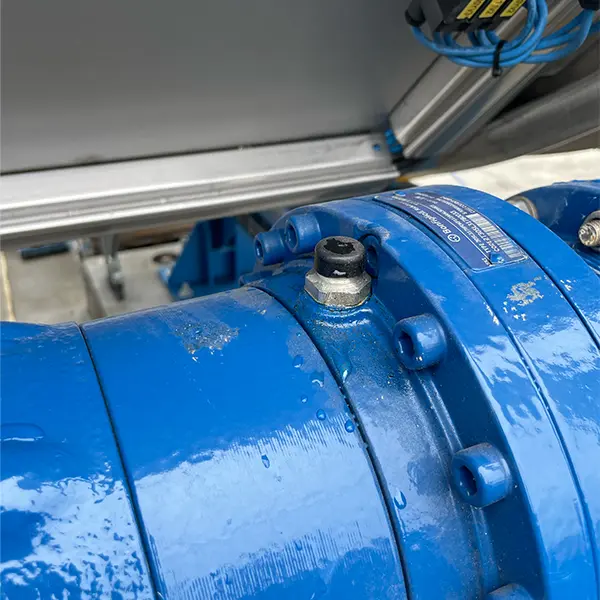
Figure #1
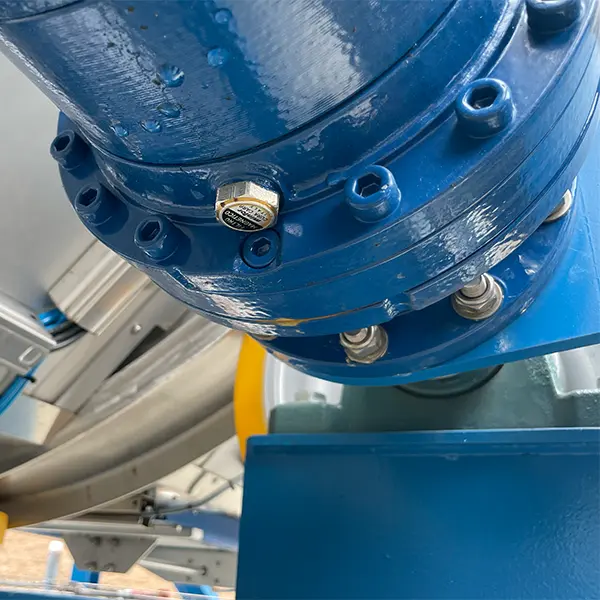
Figure #2
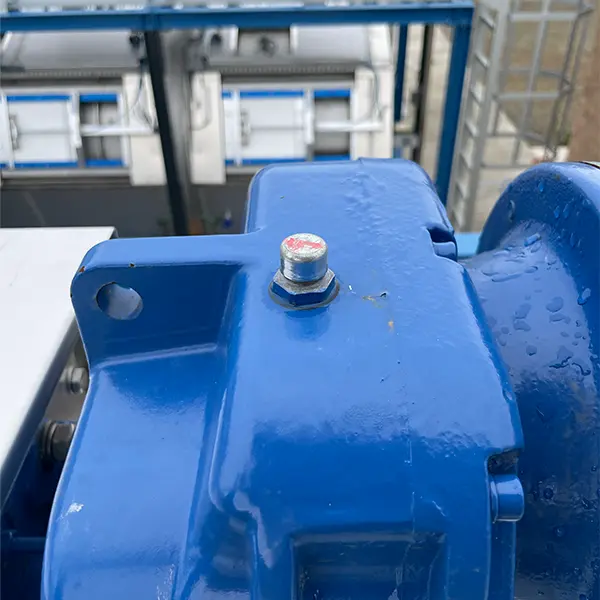
Figure #3
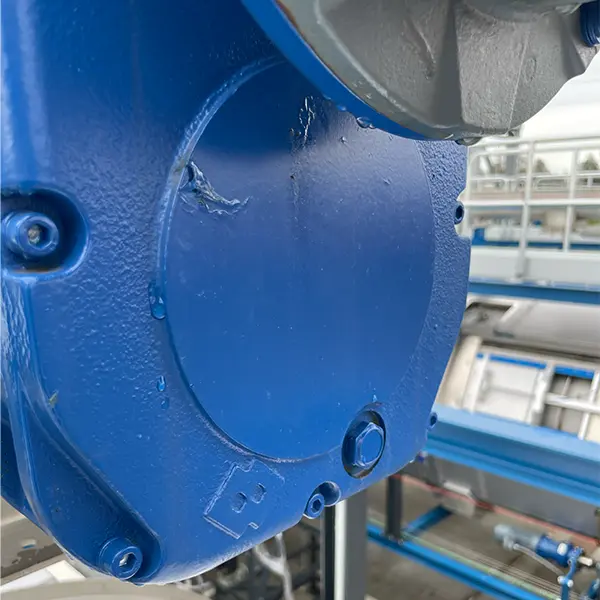
Figure #4
Sensor Inspection and Cleaning
Periodically cleaning the connection threads for the various sensors is a great way to confirm that each sensor is properly seated within its respective port and are reading accurate values.
Personal Protective Equipment:
Timeframe
- Estimated total of 1 man hour to complete.
Procedure
-
Safety First
- Put on the PPE to protect yourself from any potential hazards.
-
Turn off any BioDryer Cycles
- If a process (drying, loading, or unloading) is active, cease it by adhering to the outlined procedure.
-
Locate and Clean sensors from the Air-Skid
One sensor at a time remove, clean, and test the various sensors before re-installing the sensor.- Identify the location of the Air Skid Sensors
- Note the orientation of the sensor before removing.
- Remove each sensor from its connection point, thoroughly cleaning the threads or means of connection.
- Test the sensor with the appropriate equipment
- For thermocouples calibrate to ensure accuracy.
- Reinstall the sensor with the same orientation as noted before removing the sensor.
-
Locate and Clean sensors from the BioDryer Rotating Body
One sensor at a time remove, clean, and test the various sensors before re-installing the sensor.- Identify the location of the BioDryer Rotating Body Sensors
- Note the orientation of the sensor before removing.
- Remove each sensor from its connection point, thoroughly cleaning the threads or means of connection.
- Test the sensor with the appropriate equipment
- For thermocouples calibrate to ensure accuracy.
- Reinstall the sensor with the same orientation as noted before removing the sensor.
-
Locate and Clean sensors from the BioDryer skid
One sensor at a time remove, clean, and test the various sensors before re-installing the sensor.- Identify the location of the BioDryer Skid Sensors
- Note the orientation of the sensor before removing.
- Remove each sensor from its connection point, thoroughly cleaning the threads or means of connection.
- Test the sensor with the appropriate equipment.
- Reinstall the sensor with the same orientation as noted before removing the sensor.
-
Locate and Clean sensors from the Wet Screw Conveyor
One sensor at a time remove, clean, and test the various sensors before re-installing the sensor.- Identify the location of the Wet Screw Conveyor Sensors
- Note the orientation of the sensor before removing.
- Remove each sensor from its connection point, thoroughly cleaning the threads or means of connection.
- Test the sensor with the appropriate equipment.
- Reinstall the sensor with the same orientation as noted before removing the sensor.
-
System Test
- Using an HMI put the BioDryer into AUTO Mode to test the sensors and ensure BioDryer operability.
- Follow the steps under Manual Operations; Start and Stop the Airflow.
- Perform a final check of information from the sensors to determine if any are faulty.
-
System Activation
- Reactivate the BioDryer to normal operational mode using the Human-Machine Interface (HMI).